Starbeamrainbowlabs

Stardust
Blog


Archive


Mailing List Articles Atom Feed Comments Atom Feed Twitter Reddit Facebook

Tag Cloud

3d 3d printing account algorithms android announcement architecture archives arduino artificial intelligence artix assembly async audio automation backups bash batch blender blog bookmarklet booting bug hunting c sharp c++ challenge chrome os cluster code codepen coding conundrums coding conundrums evolved command line compilers compiling compression conference conferences containerisation css dailyprogrammer data analysis debugging defining ai demystification distributed computing dns docker documentation downtime electronics email embedded systems encryption es6 features ethics event experiment external first impressions freeside future game github github gist gitlab graphics guide hardware hardware meetup holiday holidays html html5 html5 canvas infrastructure interfaces internet interoperability io.js jabber jam javascript js bin labs latex learning library linux lora low level lua maintenance manjaro minetest network networking nibriboard node.js open source operating systems optimisation outreach own your code pepperminty wiki performance phd photos php pixelbot portable privacy problem solving programming problems project projects prolog protocol protocols pseudo 3d python reddit redis reference release releases rendering research resource review rust searching secrets security series list server software sorting source code control statistics storage svg systemquery talks technical terminal textures thoughts three thing game three.js tool tutorial twitter ubuntu university update updates upgrade version control virtual reality virtualisation visual web website windows windows 10 worldeditadditions xmpp xslt

Making Mathematical Art with C Sharp and PPM

The other day I wanted to (for some random reason) create some stripes. Having worked out a simple algorithm that would produce some rather nice stripes given an (x, y) pixel coordinate, I set out to write a small script that would generate some stripes for me.

I discovered that it wasn't as easy as I'd thought. Lockbits confused me, and I couldn't find a good enough example to learn from. Thankfully I caught wind of a ridiculously simple image format called PPM (Portable Pixel Map) that I could use to output a byte[] array of pixel data as a valid image.

Here's a diagram I made to illustrate the format:
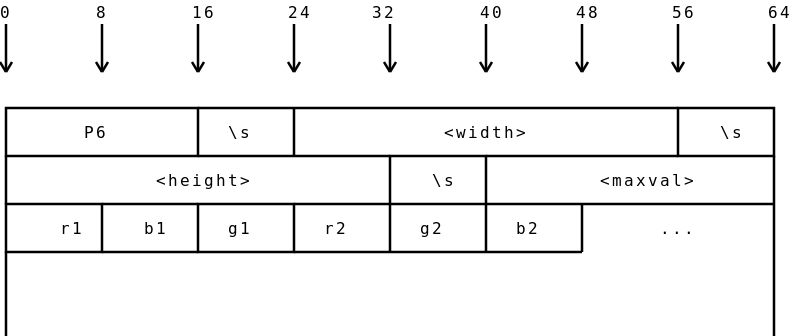
The PPM Format.

The format basically consists of a ascii header, followed by a raw dump of a byte[] full of pixel data. The header contains several parts:

  1. The characters P6 (This is called the 'magic byte', and can be used to identify the type of content that a file contains)
  2. A single whitespace (I used \s in the diagram because that is the escape code for whitespace in a javascript regular expression)
  3. The width of the image, in ascii
  4. Another single whitespace
  5. The height of the image, in ascii
  6. Another single whitespace
  7. The maximum value that the red / green / blue pixels will go up to. This value will be considered 100% saturated. Normally, you'd want this to be 255.
  8. Another single whitespace - not shown on the diagram (oops); usually a new line (\n).
  9. The raw byte[] array of pixel data.

Once you've your pixel data as a PPM, you can then use something like imagemagick to convert it to a png with a command like mogrify -format png image.ppm or convert image.ppm image.png.

Some red stripes.

Using this method, you can generate almost anything using pure C#. Here's the code I used to generate the above stripes:

using System;
using System.IO;

public class EmptyClass
{
    #region Settings

    static string filename = "image.ppm";

    static int width = 1500;
    static int height = 400;

    static int stripeWidth = width / 30;
    static rgb stripeLowCol = new rgb(204, 0, 0);
    static rgb stripeHighCol = new rgb(255, 51, 51);

    static float multiplier = 1f;

    #endregion

    #region Image Generator

    public static void Main()
    {
        byte[] pixelData = new byte[width * height * 3];
        for(int x = 0; x < width; ++x)
        {
            for(int y = 0; y < height; ++y)
            {
                int currentPixel = ((y * width) + x) * 3;
                pixelData[currentPixel] = redPixel(x, y);
                pixelData[currentPixel + 1] = greenPixel(x, y);
                pixelData[currentPixel + 2] = bluePixel(x, y);
            }
        }

        StreamWriter destination = new StreamWriter(filename);
        destination.Write("P6\n{0} {1}\n{2}\n", width, height, 255);
        destination.Flush();
        destination.BaseStream.Write(pixelData, 0, pixelData.Length);
        destination.Close();
    }

    #endregion

    #region Pixel value functions - edit these

    public static byte redPixel(int x, int y)
    {
        return (byte)(((x + y) % stripeWidth < stripeWidth / 2 ? stripeLowCol.r : stripeHighCol.r) * multiplier);
    }
    public static byte greenPixel(int x, int y)
    {
        return (byte)(((x + y) % stripeWidth < stripeWidth / 2 ? stripeLowCol.g : stripeHighCol.g) * multiplier);
    }
    public static byte bluePixel(int x, int y)
    {
        return (byte)(((x + y) % stripeWidth < stripeWidth / 2 ? stripeLowCol.b : stripeHighCol.b) * multiplier);
    }

    #endregion
}

#region Utility Classes
class rgb
{
    public byte r, g, b;
    public rgb(byte inCol)
    {
        r = g = b = inCol;
    }
    public rgb(byte inR, byte inG, byte inB)
    {
        r = inR;
        g = inG;
        b = inB;
    }
}
#endregion

The settings at the top control the appearance of the output. filename is the filename to write the image to, width and height set the dimensions of the image, stripeWidth sets the width in pixels of each stripe, and stripeLowCol and stripeHighCol set the colour of the different stripes. The multiplier at the end isn't actually needed, but you can use it to brighten or dim the resulting image if you want.

Not content with stripes, I played around for a bit longer and came up with this:

Another mathematical picture.

Above: My second attempt at mathematical art. It looks better in my native image previewer...

The above actually consists of a 3 different functions - one for each channel. Here they are:

public static byte redPixel(int x, int y)
{
    return (byte)(Math.Sin(x / (width / (Math.PI * 10))) * 255 * Math.Sin(y / (height / (Math.PI*10))));
}
public static byte greenPixel(int x, int y)
{
    return (byte)(Math.Sin(x / (width / (Math.PI * 5))) * 128 * Math.Sin(y / (height / (Math.PI * 5))));
}
public static byte bluePixel(int x, int y)
{
    return (byte)((Math.Sin(x / (width / Math.PI)) * 52 * Math.Sin(y / (height / Math.PI))) + 25);
}

I don't actually know how it works (even though I wrote it strangely enough), but if you do know, please leave a comment down below!

Since it might be a bit difficult to see, here's an animated gif that shows each of the colour channels broken down:

Illusion Boxes Decoded

Lastly, I have rendered a larger copy of the above. You can view it here (Size: 4.8MB).

Have you made some interesting mathematical art? Post it in the comments below!

Test C♯ code online with repl.it

I've known about repl.it for a while now. It is a site that provides you with a REPL (Read-Eval-Print-Loop) for many different languages, without you having to install the language in question thanks to the native client.

A REPL (in case you didn't know) is like a command prompt, but for a specific programming language or environment. For example, if you type node into your command prompt (if you have Node.js installed), it will start a REPL for you to play around with.

Recently I have discovered that repl.it also supports C♯ (via the mono compiler version 4.0.4.0 at the time of typing), and it lets you write, compile and run C♯ code without ever leaving your browser. I was so surprised by this I thought that I'd make a blog post about it. Apparently you can even embed things you've created into other pages too - here's a small test program I wrote whilst playing around with it:

Links:

Update: Corrected The expansion of REPL.

Automatic Updating in C#

Once you start writing programs in C♯ that are actually useful, at some point the question of how you are going to deliver updates to your users is sure to come up.

You could upload new versions to your website (and you should!) and ask everyone to subscribe to your blog, but that's a hassle for users. Rather, you want some kind of automatic system that at least lets your users know if there's an update available. It would be even better if it could update itself automatically.

Unfortunately, building a fully automatic update system in C# is not a particularly trivial task, as I have discovered. Thankfully though, I've done most of the hard work for you, so you don't have to.

Before we continue, it should be noted that the code I'm about to show you should not be taken as is. There are several serious pitfalls that I haven't fixed in the code below (some of which I'll point out and explain). Rather, this code should be taken as a starting point for your own system.

To build an automatic updating system, we need to know 3 things:

  1. The local version of the program installed
  2. The version of the program on the server
  3. Whether the version on the server is newer than the version currently installed locally.

These problems are quite easily solved. Let's start with a simple example program:

using System;

class Program
{
    static string version = "0.1";
    static void Main(string[] args)
    {
        // Continue on with the main body of the program
        Console.WriteLine("Rockets are cool.");
    }
}

This is practically a hello world program - yours will be much more complicated than this. Problem #1 is already solved in the above - we have a variable version that contains the current version of the software. Note that it's a a string because in the future we might want more than one decimal point. If you are interested in version numbering, check out semantic versioning. Anyway, let's move on.

The first snag I hit here was that a running C# program cannot replace itself while it is running. This is easily solved, however, by a helper program that will do the actual updating. This presents another issue though, how do we extract the version from the program itself? The helper application won't have access to anything contained within the main program (not without some seriously clever wizardry at least). There are several things we can do here. We could get the program to write out its version to a text file every time it runs, or we could build in a special flag that outputs the version number and then exits. We could also bundle the version number in a separate text file along with the program itself, although this would be prone to tampering. You decide what's best for you.

My solution was to write out the version number to a text file:

// Write out our current version
File.WriteAllText("version.txt", version);
        // Exit now if we were just asked for our version
if (args.Length > 0 && args[0].Trim().ToLower() == "writeversion")
    return;

Next up we need a helper program that can ask a remote server what the latest version of the program is, and download the new version if the version on the server is newer than the version that is installed on the local machine.

We can use a WebClient to download a text file that describes the version currently on the remote server, and the Version class to compare versions. Here's the code I came up with:

using System;
using System.Net;
using System.IO;
using System.IO.Compression;
using System.Collections.Generic;
using System.Text.RegularExpressions;
using System.Diagnostics;
using System.Text;
using System.Security.Cryptography;
using System.Security.Permissions;

class Program
{
    static string remoteVersionURL = "http://localhost:8090/program-version.txt";

    static void Main(string[] args)
    {
        if(args.Length == 0)
        {
            Console.WriteLine("This helper program updates the main program. Call it like this:");
            Console.WriteLine("\thelper.exe update");
            return;
        }

        WebClient webClient = new WebClient();

        switch(args[0].Trim().ToLower())
        {
            case "update":
                Console.WriteLine("Checking for updates...");
                // Format:
                //  <version> <url> <hash>
                string remoteVersionText = webClient.DownloadString(remoteVersionURL).Trim();
                string[] remoteVersionParts = (new Regex(@"\s+")).Split(remoteVersionText);
                string remoteUrl = remoteVersionParts[1];
                string remoteHash = remoteVersionParts[2];

                Version localVersion = new Version(File.ReadAllText("version.txt").Trim());
                Version remoteVersion = new Version(remoteVersionParts[0]);

                if(remoteVersion > localVersion)
                {
                    // Do an update here
                }
                break;
            default:
                Console.WriteLine("Unknown command.");
                    break;
        }
    }
}

The above reads the version.txt file that the main program generates, and downloads a text file from a remote url that contains information about the latest version of the program in question. If you were doing this for real you'd point this as a https url to prevent man-in-the-middle attacks. For testing purposes, I've started a server on my local machine with PHP. I've also added a couple of using statements that we will be using later.

The file that it downloads has several parts. Here's the example file I used:

0.2     http://localhost:8090/release.zip           e8643f52dbaff369614128b9683550879a01c3f4

Where:

  1. The version number stored on the server.
  2. The url at which the latest version can be found.
  3. The hash of the compress file that the url points to.

The third part of this version file is important. We can hash the file that we have downloaded, and if the hash we compute identical to that of the remote file, we know that the downloaded file is safe, assuming that an attacker hasn't modified the version file that we downloaded in the first place.

Next we need to actually do the update. Before that though, we ought to ask the user first. I used a quick Console.ReadLine() loop, but you should probably put together some sort of GUI.

// There is a new version on the server!
Console.WriteLine("There is a new version available on the server.");
Console.WriteLine("Current Version: {0}, New version: {1}", localVersion, remoteVersion);
while (true)
{
    Console.Write("Perform update? ");
    string response = Console.ReadLine().Trim().ToLower();
    if (response.StartsWith("y"))
    {
        PerformUpdate(remoteUrl, remoteHash);
        break;
    }
    else if (response.StartsWith("n"))
    {
        Console.WriteLine("Abort.");
        break;
    }
}

With that out of the way, we can actually do the update. Let's start by writing the beginnings of thePerformUpdate() method:

static bool PerformUpdate(string remoteUrl, string expectedHash)
{
    Console.WriteLine("Beginning update.");
    string downloadDestination = Path.GetTempFileName();

    Console.Write("Downloading {0} to {1} - ", remoteUrl, downloadDestination);
    WebClient downloadifier = new WebClient();
    downloadifier.DownloadFile(remoteUrl, downloadDestination);
    Console.WriteLine("done.");

    return true;
}

Next, we need to use that hash I mentioned above. That particular hash is SHA1 (although you should use SHA2 or even better SHA3), so we need to hash our zip that we downloaded with SHA1:

Console.Write("Validating download - ");
string downloadHash = GetSHA1HashFromFile(downloadDestination);
if (downloadHash.Trim().ToLower() != expectedHash.Trim().ToLower()) {
    // The downloaded file looks bad!
    // Destroy it quick before it can do any more damage!
    File.Delete(downloadDestination);
    // Tell the user about what has happened
    Console.WriteLine("Fail!");
    Console.WriteLine("Expected {0}, but actually got {1}).", expectedHash, downloadHash);
    Console.WriteLine("The downloaded update may have been modified by an attacker in transit!");
    Console.WriteLine("Nothing has been changed, and the downloaded file deleted.");
    return false;
}
else
{
    Console.WriteLine("ok.");
}

The above calculates the hash of the downloaded file, and alerts the user if the hash computed is different to that reported by the remote server. Here's the GetSHA1HashFromFile() method:

/// <summary>
/// Gets the SHA1 hash from file.
/// Adapted from https://stackoverflow.com/a/16318156/1460422
/// </summary>
/// <param name="fileName">The filename to hash.</param>
/// <returns>The SHA1 hash from file.</returns>
static string GetSHA1HashFromFile(string fileName)
{
    FileStream file = new FileStream(fileName, FileMode.Open);
    SHA1 sha1 = new SHA1CryptoServiceProvider();
    byte[] byteHash = sha1.ComputeHash(file);
    file.Close();

    StringBuilder hashString = new StringBuilder();
    for (int i = 0; i < byteHash.Length; i++)
        hashString.Append(byteHash[i].ToString("x2"));
    return hashString.ToString();
}

It's lifted straight from stackoverflow, but it does the job I need it to do. Now we've verified that the downloaded file is (probably) ok, we can proceed to unpack it. Note here that the built in ZipFile class throws an exception if it encounters a pre-existing file, so I'm unpacking it to a temporary directory and moving it from there.

// Since the download doesn't appear to be bad at first sight, let's extract it
Console.Write("Extracting archive - ");
string extractTarget = @"./downloadedFiles";
ZipFile.ExtractToDirectory(downloadDestination, extractTarget);
// Copy the extracted files and replace everything in the current directory to finish the update
// C# doesn't easily let us extract & replace at the same time
// From http://stackoverflow.com/a/3822913/1460422
foreach (string newPath in Directory.GetFiles(extractTarget, "*.*", SearchOption.AllDirectories))
    File.Copy(newPath, newPath.Replace(extractTarget, "."), true);
Console.WriteLine("done.");

// Clean up the temporary files
Console.Write("Cleaning up - ");
Directory.Delete(extractTarget, true);
Console.WriteLine("done.");

A word of warning: The above is windows only! Mono (the open source C# compiler for other platforms) does not support the ZipFile class as of the time of posting. A (much) better and cross platform solution would be to use an external library here, such as SevenZipSharp. You could also use a different archive type to obtain a greater compression ratio, such as .xz or .7z.

If you put it all together, you get a working auto update mechanism. The full source code can be found here: Full source code.

CSVWriter - Easy CSV Generation

Gears from brm.io

Recently I've done a group project at University. As part of this, I wrote a C♯ class specially to make generating CSV files easy. It didn't get used in the end, but I've still kept it since it sounds like the kind of thing that would be rather useful. I also decided to share it here for anyone else who needs to do this kind of thing.

You can find it on GitHub gist: CSVWriter.cs

I have written tests for it in a Visual Studio Unit Testing project, but I can't really fgure out how to include them neatly in a gist.

Here's an example of how you would use it:

CSVWriter c = new CSVWriter("file.csv");
c.WriteHeader(new string[]{ "Number", "Data" });
for(int i = 0; i < 100; i++)
{
    c.WriteRecord(new string[]{ i.ToString(), "data" });
}
c.Close();

The whole thing is fully commented with intellisense comments, so they should help if you get a bit stuck. If you can't figure out how to use it, simply post a comment down below and I'll try and help you as best I can.

Before I go, I want to mention that the animated gif I used at the top of this post is from @liabru's Gears. All credit goes to him for making them - I just recorded the animated gif :)

Easy Quadratic Ease In/Out Algorithm

Recently I wanted to add an ease in / out effect to an animation that I was writing. I searched the internet, but couldn't find anything particularly useful that actually explained how the algorithm worked, so I am writing this post.

The formula I ended up using works by taking an input between 0 and 1, and spitting out an adjusted output which is also between 0 and 1, but has the easing function applied. For easing both in and out, there are two formulae.

To ease in, for $y < 0.5$: $$ y = 2x^2 $$

To ease out, for $y >= 0.5$: $$ y = -1 + x(4 - 2x) $$

If you want to only ease in or ease out, go ahead and use just one of the above equations, and forget about the other one. Or, you can combine them to ease in and out at the same time.

Initially, I wrote my implementation in C♯ while I was testing the equations. Here's what I came up with:

using System;
using System.Threading;

namespace EasingTest
{
    class MainClass
    {
        static int width = 75;
        static int frameDelay;

        public static float QuadEaseInOut(float time)
        {
            return time < 0.5f ? 2.0f * time * time : -1.0f + (4.0f - 2.0f * time) * time;
            //return t<.5 ? 2*t*t : -1+(4-2*t)*t
        }

        public static void displayEase(float time)
        {
            float ease = QuadEaseInOut(time);

            int nextWidth = (int)(ease * width);
            Console.Write("{0}{2}{1}\r", new string(' ', nextWidth), new String(' ', width - nextWidth), 'o');
        }

        public static void Main(string[] args)
        {
            Console.Write("Enter the frame delay: ");
            frameDelay = int.Parse(Console.ReadLine());

            int count = 0;
            float step = 0.01f;
            bool dir = false; // false = right->left, true = left->right
            while(count < 10)
            {
                if(!dir)
                {
                    for(float t = step; t < 1; t += step)
                    {
                        displayEase(t);
                        Thread.Sleep(frameDelay);
                    }
                    dir = true;
                }
                else
                {
                    for(float t = 1; t > 0; t -= step)
                    {
                        displayEase(t);
                        Thread.Sleep(frameDelay);
                    }
                    dir = false;
                }

                count++;

            }
        }
    }
}

(Pastebin, Raw)

Here's an example run of the above code:

The important stuff happens in the QuadEaseInOut function on line #11. If you just want the easing function, here it is in multiple languages:

C Sharp

public static float QuadEaseInOut(float time)
{
    return time < 0.5f ? 2.0f * time * time : -1.0f + (4.0f - 2.0f * time) * time;
}

Javascript

function (t)
{
    return t<.5 ? 2*t*t : -1+(4-2*t)*t;
}

The above can easily be ported to other languages if you aren't using C♯ or Javascript.

Sources

I originally got this algorithm from gre's wonderful gist, which also contains a number of other easing functions that you might be interested in.

C♯'s String.Format: A (hopefully) complete tutorial

For a while now whenever I've been formatting strings I've been using the String.Format() method that's built into C♯. Recently, I found it's documentation page, and found that I didn't know the half of what it was capable of, so I decided to learn all of it's tricks and write a tutorial for this blog at the same time. Firstly, here's an example of it in action:

int number = 4626;
string textLine = String.Format("The number is {0}", number);
Console.WriteLine(textLine);

You can pass a number of variables in after the string's format, and they can be referenced in the string itself through the curly braces syntax: {0}. 0 refers to the first variable, {1} to the second, etc. Anything you pass in will have it's .ToString() method called, so you can control how your classes are represented.

We can go one better than the above though. The Console.Write() and Console.WriteLine() methods have String.Format() functionality built in, so we can shorten the above down to 2 lines:

int number = 4626;
Console.WriteLine("The number is {0}", number);

Logging a table of data to the console? You can also pad any variable to make it a given length. Just add a comma and then the length that you want it to pad shorter strings to:

Random rng = new Random();
for(int i = 0; i < 100; i++)
{
    Console.WriteLine("{0,4}: {1}", i, rng.Next());
}

The above will output something similar to this:

   0: 1386044068
   1: 337840762
   2: 796579848
   3: 2124870500
   4: 1451010095
   5: 2086322183
   6: 2057125438
   7: 1856321748
   8: 1688522403
   9: 982979897
  10: 1571218679
  11: 1851393877
  12: 572762676
  13: 549024616
  14: 1496101994
...

By default, it pushes things to the right, but you can make it do the opposite by adding a minus sign to the padding length. So if you wanted to push the first variable to the left and have a minimum length of 4, it would be {0,-4}.

It doesn't stop there though. For numbers, you can convert can control the number of decimal places that are displayed. This is done like this:

Random rng = new Random();
for(int i = 0; i < 100; i++)
{
    Console.WriteLine("{0,4}: {1:0.00}", i, rng.NextDouble());
}

Notice that we're using a colon instead of a comma here. The above will output something like this:

   0: 0.86
   1: 0.91
   2: 0.97
   3: 0.41
   4: 0.70
   5: 0.81
   6: 0.26
   7: 0.73
   8: 0.93
   9: 0.14
  10: 0.80
  11: 0.71
...

You can even automatically convert a number to a percentage by adding a percent sign (%), and it will automatically be multiplied by 100:

Random rng = new Random();
for(int i = 0; i < 100; i++)
{
    Console.WriteLine("{0,4}: {1:0.00%}", i, rng.NextDouble());
}

Then you get an output like this:

   0: 59.62%
   1: 37.75%
   2: 33.98%
   3: 44.40%
   4: 66.73%
   5: 83.00%
   6: 95.67%
   7: 47.98%
   8: 5.05%
   9: 88.48%

If you want to ensure that all the values have the same width (and who wouldn't?), you can combine the two syntaxes like this:

Random rng = new Random();
for(int i = 0; i < 100; i++)
{
    Console.WriteLine("{0,4}: {1,-8:0.00%}", i, rng.NextDouble());
}

The above produces something like this:

...
  12:   36.60%
  13:   60.48%
  14:   13.96%
  15:   36.88%
  16:    6.55%
  17:   89.51%
  18:   19.18%
  19:   91.98%
...

Numbers can also be converted to hex like this:

Random rng = new Random();
for(int i = 0; i < 100; i++)
{
    Console.WriteLine("{0,4}: {1:x8}", i, rng.Next());
}

The above formats the numbers as lowercase hex, and pads them to be at least 8 characters long. Here's what the above might output:

   0: 4d7867e8
   1: 3dc7d06d
   2: 118b1c4b
   3: 5cd477c5
   4: 580a74e1
   5: 69d50a4b
   6: 7ccf118e
   7: 25725808
   8: 093ddea4
   9: 164a7baf
...

Simply change the lowercase x to an uppercase one to change the format to be uppercase. Numbers aren't the only thing that String.Format() lets you play with though. Dates are supported too:

DateTime dt = DateTime.Now;
Console.WriteLine("Day {0:d} of the month of {0:m} the {0:yyyy}th year", dt);
// Output example: Day 04/09/2015 of the month of 04 September the 2015th year

That pretty much concludes this post about String.Format(). If I tried to demonstrate every little feature, we would be here all year! Before I go though, I have put together a quick reference guide on all the different formats that it supports:

Format Example Description
{0} cheese The first variable
{0,8} cheese Pad the first variable on the left to 8 characters
{0,-8} cheese Pad the first variable on the right to 8 characters
{0:0.00} 4.38 Round the first variable to 2 decimal places
{0,6:0.000} 3.432 Round the first variable to 3 decimal places and then pad it on the left to 6 characters
{0:x} efe9a Convert the first variable to lowercase hex
{0:X8} EFE9A Convert the first variable to uppercase hex and then pad it on the left to 8 characters.
{0:d} 06/09/2015 Extract the date part of a DateTime object.
{0:t} 02:19pm Extract the time part of a DateTime object
{0:hh} 02 Extract the hour from a DateTime object
{0:mm} 19 Extract the minute from a DateTime object
{0:ss} 56 Extract the seconds from a DateTime object

{0:dd} | 09 | Extract the day from a DateTime object {0:MM} | 09 | Extract the month from a DateTime object {0:M} | September | Extract the long month from a DateTime object {0:yy} | 15 | Extract the short year from a DateTime object {0:yyyy} | 2015 | Extract the long year from a DateTime object

Update 29th October 2015: A commenter by the name Tom let me know that in C♯ 6.0 and above (that's the .NET framework 4.6+) comes with another handy feature that lets you substitute in the contents of a variable directly. Here's his example:

int number = 4626;
Console.WriteLine("The number is {number}");

The above would output The number is 4626. This also extendes to properties of objects, letting you do something like this:

Console.WriteLine("Account {myAccount.Id} belongs to {myAccount.Name} and contains £{myAccount.Balance}.");

There's also a shorthand version of String.Format. Simply prefix a string with a dollar sign ($) and the string will be pushed through String.Format for you:

string display = $"Launch in T minus {rocket.Countdown} seconds!";
Console.WriteLine(display);

You can find out more here: New Language features of C# 6

Sources

3D Worley Noise with noisebox

Worley Noise Recently, I've been writing a command line noise generation tool in C♯, and I've called it noisebox. Initially I found a few noise generation algorithms that other people had already implemented, so all I had to do was write an extensible interfacde on top of the code I'd found. When I came to Worley noise, I couldn't find an implementation that I could understand (I haven't taken a look at delegates properly yet), so I decided to write my own. It's still got some bugs in it, but I've decided to relase the Worley noise implementation on it's own first, and then I will tidy up a few loose ends and release the full code on GitHub (loko out for a blog post soon!).

Here's a link to a gist of the Worley noise generator: Worley.cs

The imbuilt documentation comments (what do you call them?) should give you enough information to use it, but if you get stuck post a comment below and I will try and help you out.

The code will be released under the Mozilla Public License 2.0.

This post's title include the word "3D" - but the image at the top is very much in 2D. To demonstrate the 3D-ness of the algorithm, I added the --frames and --offset options to noisebox and rendered 1000 frames of noise, and then stitched the together with ffmpeg. I've uploaded the result to youtube.

Programming 2 Coursework - PickupTheCrew

A screenshot PickupTheCrew I recently got an email from a university friend asking for my Programming 2 coursework. It gave me the idea that I should make a blog post about it, so here it is. For my Programming 2 coursework this seester I was asked to build a game to a specification called "Pickup The Crew". My implementation can be found below:

I am releasing this under the CC-BY-SA (Creative Commons Attribution Share-Alike) license. If this is not the correct license for this thing, please contact me (leave a message in the comments!) and I will change it.

You can find it here: PickUpTheCrew

To extract the above archive you will need 7-zip. Once extracted navigate to PickupTheCrew\PickupTheCrew\bin\Windows\Release and double click PickupTheCrew.exe.

If you have any problems, please comment below and I will try to help.

TraceRoutePlus

Hello!

Today I have for you a traceroute tool that I have built. I made it mainly for educational purposes, since I wanted to test the code behind it ready for something slightly more complicated.

Here is an example:

C:\>tracerouteplus github.com
Traceroute Plus
---------------
By Starbeamrainbowlabs <https://starbeamrainbowlabs.com>

=== github.com ===
 1: xxx.xxx.xxx.xxx 1ms
 2: xxx.xxx.xxx.xxx 33ms
 3: xxx.xxx.xxx.xxx 36ms
 4: xxx.xxx.xxx.xxx 54ms
 5: 4.69.149.18     119ms
 6: 4.53.116.102    115ms
 7: 192.30.252.207  118ms
 8: 192.30.252.130   118ms
=== github.com end ===

You can download the latest version of the tool from my repository. Instructions can be found in the download section of the README.

The code is up on GitLab, and pull requests are welcome :)

Edit: Moved to GitLab from GitHub.

Coding Conundrums 3

Number three in a series of more than two. But probably less than a thousand.

I have finished my solutions to Rob Miles' Coding Conundrums. If you want to complete them yourself before looking at my solutions, take a look at the pdf.

My solutions share quite a few functions, perhaps I should look into writing a library for them.

3.1: Total Carp

People keep coming to me and bragging about the fish that they just caught. They tell me the make of the fish, "Carp" for example, and how much it weighed, 2000 grams for example.

I want a program into which I can type:

  • The name of each latest fish
  • The weight of each latest fish
  • When I enter a fish called "Finished" (fish pun alert) I want the program to print out:

  • The heaviest fish(name and weight)
  • The lightest fish(name and weight)
  • The total weight of all the fish that have been entered

My solution uses structs - do you remember these from semester 1?

using System;
using System.Collections.Generic;

public class Program
{
    public struct Fish
    {
        public string Name;
        public int Weight;

        public Fish(string inName, int inWeight)
        {
            Name = inName;
            Weight = inWeight;
        }

        public override string ToString()
        {
            return String.Format("{0} at {1}g", Name, Weight);
        }
    }

    public static List<Fish> FishList = new List<Fish>();

    public static int totalWeight;

    public static void Main(string[] args)
    {
        int i = 1;
        while(true)
        {
            string inFishName = ReadString(String.Format("Enter fish {0}'s name: ", i));

            if(inFishName.ToLower() == "finished")
                break;

            int inFishWeight = ReadNumber(String.Format("Enter fish {0}'s weight (in grams): ", i));

            FishList.Add(new Fish(inFishName, inFishWeight));

            Console.WriteLine("Fish added.");
        }

        /// calculate the statistics ///
        // variable declaration
        Fish heaviestFish = FishList[0];
        Fish lightestFish = FishList[0];

        foreach(Fish currentFish in FishList)
        {
            if (currentFish.Weight > heaviestFish.Weight)
                heaviestFish = currentFish;
            if (currentFish.Weight < lightestFish.Weight)
                lightestFish = currentFish;

            totalWeight += currentFish.Weight;
        }

        // Print out the statistics calculated above
        Console.WriteLine("Total weight: {0}", totalWeight);
        Console.WriteLine("Heaviest fish: {0}", heaviestFish.ToString());
        Console.WriteLine("Lightest fish: {0}", lightestFish.ToString());
    }

    /// <summary>
    /// Reads a string in from the user.
    /// </summary>
    /// <param name="prompt">The prompt to display</param>
    /// <param name="minlength">The minimum length of the input the user enters.</param>
    /// <returns>The string the user entered.</returns>
    public static string ReadString(string prompt, int minlength = 1)
    {
        while(true)
        {
            Console.Write(prompt);
            string line = Console.ReadLine();
            if(line.Length < minlength)
            {
                Console.WriteLine("Please enter something that is at least {0} characters.");
                continue;
            }

            return line;
        }
    }

    /// <summary>
    /// Reads a number from the user.
    /// </summary>
    /// <remarks>Depends on ReadString()</remarks>
    /// <param name="prompt">The prompt to display to the user.</param>
    /// <returns>The number that the user entered</returns>
    public static int ReadNumber(string prompt)
    {
        while(true)
        {
            string line = ReadString(prompt).Trim();
            try {
                return int.Parse(line);
            }
            catch
            {
                Console.WriteLine("Sorry, that was not a valid number.");
            }
        }
    }
}

(Pastebin, 32 bit binary)

3.2: Fish Popularity Contest

It occurs to me that it would be useful to add another feature to the fish program above. I'd like to know which is the most popular fish. That way I can buy shares in it. Or something. So I've added the following extra requirement:

  • The most popular fish (i.e. the fish that we have seen the most of)

Note that my keyboard skills are not very gud. And so if I type CArp rather than Carp I'd like the program to behave sensibly and count them both as the same make of fish.

The addition of another List to the loop at the end of the program and a few extra bits and pieces yields FishListPlus:

using System;
using System.Collections.Generic;

public class Program
{
    public struct Fish
    {
        public string Name;
        public int Weight;

        public Fish(string inName, int inWeight)
        {
            Name = inName;
            Weight = inWeight;
        }

        public override string ToString()
        {
            return String.Format("{0} at {1}g", Name, Weight);
        }
    }

    public static List<Fish> FishList = new List<Fish>();

    public static int totalWeight;

    public static void Main(string[] args)
    {
        int i = 1;
        while(true)
        {
            string inFishName = ReadString(String.Format("Enter fish {0}'s name: ", i));

            if(inFishName.ToLower() == "finished")
                break;

            int inFishWeight = ReadNumber(String.Format("Enter fish {0}'s weight (in grams): ", i));

            FishList.Add(new Fish(inFishName, inFishWeight));

            Console.WriteLine("Fish added.");
        }

        /// calculate the statistics ///
        // variable declaration
        Fish heaviestFish = FishList[0];
        Fish lightestFish = FishList[0];

        Dictionary<string, int> PopularFish = new Dictionary<string, int>();

        foreach(Fish currentFish in FishList)
        {
            if (currentFish.Weight > heaviestFish.Weight)
                heaviestFish = currentFish;
            if (currentFish.Weight < lightestFish.Weight)
                lightestFish = currentFish;

            totalWeight += currentFish.Weight;

            int CurrentFishCount;
            if(PopularFish.TryGetValue(currentFish.Name.ToLower(), out CurrentFishCount))
            {
                PopularFish[currentFish.Name.ToLower()]++;
            }
            else
            {
                PopularFish[currentFish.Name.ToLower()] = 1;
            }
        }

        // Print out the statistics calculated above
        Console.WriteLine(" ----------------------------- ");
        Console.WriteLine("| {0,-12} | {1,12} |", "Name", "Count");
        Console.WriteLine("|--------------|--------------|");
        foreach(KeyValuePair<string, int> FishCount in PopularFish)
        {
            Console.WriteLine("| {0,-12} | {1,12} |", FishCount.Key, FishCount.Value);
        }
        Console.WriteLine(" ----------------------------- ");

        Console.WriteLine("Total weight: {0}", totalWeight);
        Console.WriteLine("Heaviest fish: {0}", heaviestFish.ToString());
        Console.WriteLine("Lightest fish: {0}", lightestFish.ToString());
    }

    /// <summary>
    /// Reads a string in from the user.
    /// </summary>
    /// <param name="prompt">The prompt to display</param>
    /// <param name="minlength">The minimum length of the input the user enters.</param>
    /// <returns>The string the user entered.</returns>
    public static string ReadString(string prompt, int minlength = 1)
    {
        while(true)
        {
            Console.Write(prompt);
            string line = Console.ReadLine();
            if(line.Length < minlength)
            {
                Console.WriteLine("Please enter something that is at least {0} characters.");
                continue;
            }

            return line;
        }
    }

    /// <summary>
    /// Reads a number from the user.
    /// </summary>
    /// <remarks>Depends on ReadString()</remarks>
    /// <param name="prompt">The prompt to display to the user.</param>
    /// <returns>The number that the user entered</returns>
    public static int ReadNumber(string prompt)
    {
        while(true)
        {
            string line = ReadString(prompt).Trim();
            try {
                return int.Parse(line);
            }
            catch
            {
                Console.WriteLine("Sorry, that was not a valid number.");
            }
        }
    }
}

(Pastebin, 32 bit binary)

3.3: Ingredients Tracker

Talking of food, I want something to keep track of ingredients that I might have in my kitchen. My program will have two modes:

  1. The program will start in this mode. I can enter the name and amount of each ingredient. If I type in the name "Search" the program will go into mode 2 (see below).
  2. I can type the name of an ingredient and the program will tell me how much of that ingredient I have in stock. If I type in the name "Enter" the program will go into mode 1 (see above)

If you fancy getting clever, you can add a third command, "List", which will list out all the ingredients that have been entered.This is making me quite hungry.

I think I’ll go off for a pie while you work on these.

I decided to use a dictionary for this one, which holds the amount of each item as an int, with the name as the key. Since you can't have duplicate keys, I ask the user if they type in the same key more than once whether they do actually want to overwrite their previous entry.

using System;
using System.Collections.Generic;

public class Program
{
    public enum Mode
    {
        DataEntry,
        Search
    }

    public static Mode CurrentMode = Mode.DataEntry;

    static Dictionary<string, int> Stock = new Dictionary<string, int>();

    public static void Main()
    {
        Console.WriteLine("Kitechen Tracker v0.2");
        Console.WriteLine("---------------------");
        Console.WriteLine("Coding Conundrum 3.3, challenge set by Rob Miles, conquered by Starbeamrainbowlabs");
        Console.WriteLine("Enter the special name 'search' to switch to search mode");
        Console.WriteLine("Enter the special name 'enter' to switch back to data entry mode");
        Console.WriteLine("Enter the special name 'list' at any time to view the current stock");
        Console.WriteLine();
        while(true)
        {
            switch (CurrentMode)
            {
                case Mode.DataEntry:
                    string inName = ReadString("Enter the name of the next ingredient: ").Trim().ToLower();
                    switch(inName)
                    {
                        case "search":
                            Console.WriteLine("Switching to search mode.");
                            CurrentMode = Mode.Search;
                            continue;

                        case "list":
                            ListStock();
                            continue;

                        default:
                            int inAmount = ReadNumber("Enter the amount: ");
                            int currentAmount;
                            if(Stock.TryGetValue(inName, out currentAmount))
                            {
                                if(!Confirm(String.Format("There is already an entry for {0} (with an amount of {1}). Do you want to overwrite it? (y / n)", inName, currentAmount)))
                                {
                                    continue;
                                }
                            }
                            Console.WriteLine("{0} has been added to the list.", inName);
                            Stock[inName] = inAmount;
                            break;
                    }
                    break;

                case Mode.Search:
                    string searchString = ReadString("Enter ingredient name: ").Trim().ToLower();
                    switch(searchString)
                    {
                        case "enter":
                            Console.WriteLine("Switching to data entry mode");
                            CurrentMode = Mode.DataEntry;
                            continue;

                        case "list":
                            ListStock();
                            continue;

                        default:
                            int amountInStock;
                            if(Stock.TryGetValue(searchString, out amountInStock))
                            {
                                Console.WriteLine("Amount of {0}: {1}", searchString, amountInStock);
                            }
                            else
                            {
                                Console.WriteLine("There isn't anything called {0} in stock at the moment.", searchString);
                            }
                            break;
                    }
                    break;
            }
        }
    }

    public static void ListStock()
    {
        Console.WriteLine("Current Stock:");
        foreach(KeyValuePair<string, int> Ingredient in Stock)
        {
            Console.WriteLine("{0,-12}: {1}", Ingredient.Key, Ingredient.Value);
        }
    }

    /// <summary>
    /// Asks the user a simple yes / no question.
    /// </summary>
    /// <param name="prompt">The prompt to display</param>
    /// <returns>The user's choice as a boolean</returns>
    public static bool Confirm(string prompt)
    {
        Console.WriteLine(prompt);
        while(true)
        {
            ConsoleKeyInfo nextChar = Console.ReadKey(true);
            switch(nextChar.Key.ToString().ToLower())
            {
                case "y":
                    return true;
                case "n":
                    return false;
            }
        }
    }

    /// <summary>
    /// Reads a string in from the user.
    /// </summary>
    /// <param name="prompt">The prompt to display</param>
    /// <param name="minlength">The minimum length of the input the user enters.</param>
    /// <returns>The string the user entered.</returns>
    public static string ReadString(string prompt, int minlength = 1)
    {
        while (true)
        {
            Console.Write(prompt);
            string line = Console.ReadLine();
            if (line.Length < minlength)
            {
                Console.WriteLine("Please enter something that is at least {0} characters.");
                continue;
            }

            return line;
        }
    }

    /// <summary>
    /// Reads a number from the user.
    /// </summary>
    /// <remarks>Depends on ReadString()</remarks>
    /// <param name="prompt">The prompt to display to the user.</param>
    /// <returns>The number that the user entered</returns>
    public static int ReadNumber(string prompt)
    {
        while (true)
        {
            string line = ReadString(prompt).Trim();
            try
            {
                return int.Parse(line);
            }
            catch
            {
                Console.WriteLine("Sorry, that was not a valid number.");
            }
        }
    }
}

(Pastebin, 32 bit binary)

Art by Mythdael